myLock utilities42
Publisher Description
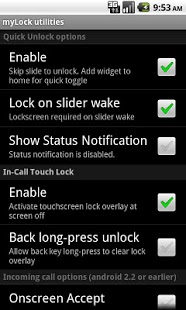
Use the myLock to enable quick unlock, incoming call options, and in-call touchscreen lock.
*Quick unlock--- automatically bypasses the unlock slider when you turn on the screen. Customizable for phones with slideout keypad.
*In-call touchscreen lock--- if you experience face dialing/muting/hangup because your touchscreen wakes up during phone calls, enable the lock. You can unlock by trackball/camera button when you do need to use the screen in-call. Otherwise, touch input is blocked after the screen goes to sleep during a call.
*Incoming call prompt--- avoid the incoming call sliders by enabling onscreen or button based call accept & reject. It appears this does not work on the newly released android 2.3 gingerbread. I am working on figuring out if there is any fix.
Optional myLock widget can be placed on the home screen for quick toggle of quick unlock mode.
myLock utilities is open source and has been developed under constant feedback and popular request from the user community. If you want to donate we have a plus purchase available. If you want to complain see below.
Important usage tips:
*Disable quick unlock before using alarm (this is an issue on HTC sense devices).
*Remove any task killer app for best results. Task killer apps are obsolete as of android 2.0 and later since automatic memory management is now part of the main android operating system. I am not responsible for any problems encountered while running task killer apps.
*Not for use with secure pin, password, or pattern lockscreens. Only functional to quick unlock the basic slide lockscreen. As of android version 2.2 This is the case. Older myLock utility version had security functions, but there is no way to make it interact with security in the newest android updates.
*Sometimes apps that are more memory heavy can slightly slow the quick unlock. This is dependent on your device performance and the app that was displaying when the phone went to sleep. There is no way we can speed this up, apps using more memory take time on some phones to be ready to take the screen after phone wakeup. That's one reason there is a lockscreen by design in this type of operating system.
I cannot reply to review comments because there is no way to do it, so please email me any feedback. I reply to all well-written feedback.
About myLock utilities
The company that develops myLock utilities is myLock. The latest version released by its developer is 42. This app was rated by 7 users of our site and has an average rating of 3.0.
To install myLock utilities on your Android device, just click the green Continue To App button above to start the installation process. The app is listed on our website since 2011-03-26 and was downloaded 453 times. We have already checked if the download link is safe, however for your own protection we recommend that you scan the downloaded app with your antivirus. Your antivirus may detect the myLock utilities as malware as malware if the download link to i4nc4mp.myLock is broken.
How to install myLock utilities on your Android device:
- Click on the Continue To App button on our website. This will redirect you to Google Play.
- Once the myLock utilities is shown in the Google Play listing of your Android device, you can start its download and installation. Tap on the Install button located below the search bar and to the right of the app icon.
- A pop-up window with the permissions required by myLock utilities will be shown. Click on Accept to continue the process.
- myLock utilities will be downloaded onto your device, displaying a progress. Once the download completes, the installation will start and you'll get a notification after the installation is finished.
Program Details
System requirements
Download information
Pricing
Version History
version 42
posted on 2011-03-26
Several fixes and updates
